
Summary
✓Reviewed by Emma ThompsonHow do esports tournament PCs differ from regular gaming PCs? The short answer: tournament rigs are built around consistency, latency, and standardization, while regular gaming PCs prioritize visual quality, personal preference, and flexible budgets. That gap matters...
Table of contents
- 1 What Actually Separates a Tournament PC From a Gaming PC
- 2 A Short Background on Tournament Hardware Standardization
- 3 Processor Requirements: Tournament Tier vs Community Tier
- 4 GPU, Memory, and Storage: Where the Specs Diverge
- 5 Display and Refresh Rate: The Clearest Competitive Divide
- 5.1 Networking Requirements at Tier-One Events
- 6 Singapore Pricing: Why the Gap Is Widening Right Now
- 7 Comparison Table: Tournament-Tier vs Community-Tier Specs
- 8 What Singapore Retail Currently Offers at Each Tier
- 9 How This Affects Buying Decisions for Aspiring Competitive Players
- 10 Limitations of This Comparison
- 11 Frequently Asked Questions
- 11.1 Do tournament PCs use different GPUs than regular gaming PCs?
- 11.2 Is 144 Hz still good enough for competitive play in 2026?
- 11.3 Why do tournament PCs need wired internet instead of Wi-Fi?
- 11.4 How much RAM does a tournament-ready PC need?
- 11.5 Why have gaming PC prices risen so much in Singapore?
- 11.6 Does a higher-end GPU matter more than a high-refresh monitor for esports?
- 12 Key Takeaways
- 13 Sources
How do esports tournament PCs differ from regular gaming PCs? The short answer: tournament rigs are built around consistency, latency, and standardization, while regular gaming PCs prioritize visual quality, personal preference, and flexible budgets. That gap matters more than ever in Singapore right now, where average gaming desktop prices have jumped 39 percent year on year to roughly S$1,860, pushing buyers to think harder about what they are actually paying for.
What Actually Separates a Tournament PC From a Gaming PC
A tournament PC is not simply a more expensive gaming PC. The core distinction is purpose: tournament hardware exists to remove variables, so that a match outcome reflects player skill rather than frame drops, network jitter, or inconsistent input latency. A regular gaming PC, by contrast, is tuned by its owner for whatever mix of visual fidelity, comfort, and cost they personally value. This is the central theme behind how esports tournament PCs differ from regular gaming PCs, and it shapes every spec decision that follows.
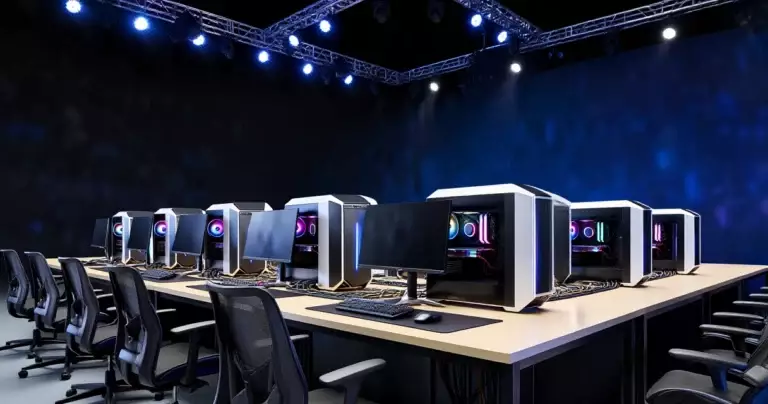
Tournament organizers therefore standardize hardware across competitors wherever possible, particularly at LAN events, so that no team gains an unfair edge from having marginally better silicon. Community and amateur play has no such constraint, which is why home gaming PCs show far more variation in CPU, GPU, and memory configuration than what appears on a competitive stage.
A Short Background on Tournament Hardware Standardization
Competitive PC gaming has always wrestled with a fairness problem that console esports mostly avoids: hardware differences can influence outcomes. As LAN tournaments professionalized through the 2010s, organizers increasingly moved toward provided, standardized rigs or strict minimum-spec rules rather than letting players bring arbitrary personal builds. By 2026, that standardization extends beyond raw specs into networking policy, with tier-one events now commonly requiring dedicated wired LAN connections rather than Wi-Fi, reflecting how much competitive integrity now depends on consistent, predictable infrastructure rather than raw power alone.
Processor Requirements: Tournament Tier vs Community Tier
CPU choice illustrates the philosophy gap well. Tournament-tier guidance for 2026 points to processors like the Intel Core i9 HX-series or the AMD Ryzen 7 7800X3D as professional-tier references, while Core i5-14400F and Ryzen 5 7600 are treated as amateur or community-tier options. A separate 2026 esports build guide goes further, arguing that single-core IPC and clock speed matter more than raw multi-core count for tournament performance, since most competitive titles are not heavily multi-threaded and instead reward the fastest possible per-core response.
This is a genuine point of divergence from how many regular gaming PC buyers shop. Outside competitive circles, buyers often chase core count for streaming, content creation, or multitasking alongside gaming, priorities that barely register in tournament-tier procurement.
GPU, Memory, and Storage: Where the Specs Diverge
On the graphics side, 2026 tournament guidance treats NVIDIA RTX 4070 Super and RTX 5070-class GPUs as tournament-relevant, while RTX 4060 or RX 7600-class cards are framed as community or amateur tier rather than top-tier tournament spec. Memory follows a similar split: a 2026 tournament spec table places 16 GB RAM as the minimum for community and amateur play, while professional-tier rigs run 32 to 64 GB of DDR5. A separate 2026 esports build guide identifies 32 GB DDR5-6000 dual-channel as the practical sweet spot for serious competitive play, which has effectively superseded older 16 GB DDR4-era mainstream builds for anyone playing at a tournament-adjacent level.
Storage tells the same story. That same 2026 tournament spec table lists 500 GB NVMe Gen 4 SSDs for lower-tier play, versus 1 to 2 TB NVMe Gen 4 or Gen 5 SSDs for professional-tier events, where faster load times and headroom for multiple installed titles reduce any risk of mid-tournament storage bottlenecks.
Display and Refresh Rate: The Clearest Competitive Divide
Display specification may be the single clearest marker separating tournament and regular gaming hardware. Amateur and community play is commonly benchmarked around 144 Hz at 1080p, while professional-tier events target 240 to 360 Hz at 1080p. Industry guidance from 2026 now treats 144 Hz as more of a floor for non-tier-one events rather than a competitive ceiling, a shift from just a few years earlier when 144 Hz was itself considered a premium spec.
The gap between a tournament PC and a regular gaming PC is now less about raw graphics settings and more about latency control, stable frame pacing, and standardized competition hardware.
A separate 2026 esports guide frames 240 Hz or 360 Hz monitors as the key competitive upgrade for serious players, while positioning 4K and HDR displays as priorities more relevant to casual gaming than to tournament performance. That is a meaningful reversal of instinct for buyers used to judging gaming monitors mainly on resolution.
Networking Requirements at Tier-One Events
Pro esports tournaments in 2026 commonly require dedicated wired LAN connections rather than Wi-Fi, with guidance from Ticket Fairy citing sub-50 ms ping targets and Gigabit-class dedicated VLAN-style connectivity for tier-one environments. This is one of the sharpest practical differences from home gaming setups, where wireless connections remain common and largely acceptable for casual or even semi-competitive play.
Readers tracking how competitive infrastructure decisions get made behind the scenes may also find it useful to see esports team broadcast setup trends for 2026, since broadcast and player-facing hardware decisions are increasingly planned together at major events.
Singapore Pricing: Why the Gap Is Widening Right Now
According to IDC data cited in Singapore price reporting, the average gaming desktop rose from S$1,334 to roughly S$1,859 over the past year, a 39 percent increase. Regular, non-gaming desktops rose 28 percent to about S$1,410 over the same period, while gaming laptops climbed 17 percent to around S$2,890. Reporting from The Straits Times and other outlets attributes much of this surge to AI infrastructure demand squeezing component supply, which has pushed prices up across both gaming and regular desktop categories, though gaming hardware has been hit harder given its reliance on premium GPUs and memory.
Singapore retail listings currently reflect that spread clearly, with gaming desktops ranging from around S$766.94 on marketplace listings up to S$3,599 on official-store promotions, depending heavily on GPU tier and memory configuration. Buyers researching gaming PC versus gaming laptop trade-offs for competitive play should weigh this pricing spread against tournament-tier requirements rather than assuming any gaming-labeled desktop meets competition standards.
Comparison Table: Tournament-Tier vs Community-Tier Specs
| Component | Community / Amateur Tier | Professional Tournament Tier |
|---|---|---|
| CPU | Core i5-14400F, Ryzen 5 7600 | Core i9 HX-series, Ryzen 7 7800X3D |
| GPU | RTX 4060, RX 7600 | RTX 4070 Super, RTX 5070 |
| RAM | 16 GB minimum | 32 to 64 GB DDR5 |
| Storage | 500 GB NVMe Gen 4 SSD | 1 to 2 TB NVMe Gen 4/5 SSD |
| Display | 144 Hz, 1080p | 240 to 360 Hz, 1080p |
| Network | Wi-Fi acceptable | Wired LAN, sub-50 ms ping |
How we know: figures above are drawn from 2026 tournament hardware guidance citing HP Singapore and Ticket Fairy networking standards, alongside a separate 2026 esports build guide’s DDR5-6000 sweet-spot recommendation. This table reflects reported tier guidance, not first-hand lab testing.
What Singapore Retail Currently Offers at Each Tier
Current Singapore retail promotions help ground these tiers in real purchasing options. Comex 2026 deal coverage showed an ROG NUC 16 configured with an Intel Core Ultra 7 270HX, RTX 5060 laptop GPU, 16 GB RAM, and a 1 TB SSD priced at S$3,249, alongside a higher-tier variant with a Core Ultra 9 290HX, RTX 5080, 32 GB RAM, and a 1 TB SSD at S$5,649. These configurations illustrate the real-world price jump between a capable gaming-tier machine and one that meets or exceeds professional tournament memory and GPU guidance.
Sources tracking Singapore gaming desktop listings on platforms such as Gain City, HardwareZone Singapore, and Shopee Singapore show entry, mid, and high-end desktops commonly spanning roughly S$1,200 to S$6,000, reinforcing that the specific configuration, not just the “gaming PC” label, determines whether a system is genuinely tournament-ready.
How This Affects Buying Decisions for Aspiring Competitive Players
For players building a setup specifically to compete rather than to play casually, the practical takeaway is to prioritize spending in the order that tournament guidance suggests: a fast, stable CPU core, sufficient DDR5 memory for the 32 GB sweet spot, a high-refresh display in the 240 to 360 Hz range, and a wired network connection, before chasing GPU-driven visual upgrades like 4K or HDR that matter more for casual play. This buying order runs somewhat opposite to how many regular gaming PC shoppers prioritize their budget, where GPU and display resolution often dominate spending decisions.
Teams and organizations making these calls at scale often plan hardware alongside broader competitive infrastructure, an approach also visible in how Hanwha Life Esports’ LCK 2026 playoff run was supported by consistent team-level preparation processes, and in the roster and hardware planning captured in the esports player agent role.
Limitations of This Comparison
This guide reflects reported 2026 tournament guidance and Singapore retail pricing snapshots rather than independent lab benchmarking of specific PCs. Tournament hardware rules also vary by organizer and by title, so a specific competition’s official rulebook should always take precedence over general tier guidance summarized here. Pricing figures are point-in-time market averages and individual retail prices will vary by promotion, bundle, and retailer at the time of purchase.
Frequently Asked Questions
Do tournament PCs use different GPUs than regular gaming PCs?
Not necessarily different models, but different tiers. 2026 tournament guidance treats RTX 4070 Super and RTX 5070-class cards as tournament-relevant, while RTX 4060 or RX 7600-class GPUs are framed as community tier. Many regular gaming PCs use the same GPU families but at lower tiers suited to personal budgets.
Is 144 Hz still good enough for competitive play in 2026?
144 Hz is now treated as a floor for non-tier-one events rather than a competitive target, according to 2026 tournament spec guidance. Professional-tier events are commonly built around 240 to 360 Hz displays instead.
Why do tournament PCs need wired internet instead of Wi-Fi?
Tier-one tournaments commonly require dedicated wired LAN connections to guarantee sub-50 ms ping and stable, dedicated Gigabit-class connectivity, according to Ticket Fairy’s 2026 tournament networking guidance. Wi-Fi introduces latency variability that is unacceptable at that level of competition.
How much RAM does a tournament-ready PC need?
Professional-tier guidance from 2026 points to 32 to 64 GB of DDR5, with a separate esports build guide identifying 32 GB DDR5-6000 dual-channel as the practical sweet spot. Amateur and community play is typically fine with a 16 GB minimum.
Why have gaming PC prices risen so much in Singapore?
IDC data cited by Singapore outlets including The Straits Times attributes much of the rise to AI infrastructure demand squeezing component supply, pushing the average gaming desktop price up 39 percent year on year to about S$1,860.
Does a higher-end GPU matter more than a high-refresh monitor for esports?
According to a 2026 esports build guide, a 240 Hz or 360 Hz monitor is considered the key competitive upgrade, while 4K and HDR display quality, which depends more heavily on GPU power, is framed as more relevant to casual gaming than tournament performance.
Key Takeaways
- Tournament PCs prioritize consistency, latency, and standardization; regular gaming PCs prioritize visual quality and personal budget.
- Professional-tier 2026 guidance points to 32 to 64 GB DDR5 RAM, 1 to 2 TB NVMe Gen 4/5 storage, and 240 to 360 Hz displays.
- Wired LAN with sub-50 ms ping is standard at tier-one events, not optional.
- Singapore’s average gaming desktop price rose 39 percent year on year to about S$1,860, according to IDC-based reporting.
- Buying priority for competitive play should run CPU core speed, then RAM, then display refresh rate, then network, ahead of GPU-driven visual upgrades.
Sources
- The Straits Times, Singapore PC price reporting citing IDC — retrieved September 18, 2026
- HP Singapore, esports hardware minimum guidance — retrieved September 18, 2026