
Summary
✓Reviewed by Emma Thompson Choosing the best esports broadcast equipment for tournaments 2026 has never been more consequential. Singapore's Straits Times reported in January 2026 that Parliament formally passed the Singapore Sports Council (Amendment) Bill, making esports a legally recognised...
Table of contents
- 1 Why Broadcast Standards Matter More in 2026
- 2 Cameras: The Backbone of Esports Broadcast Equipment for Tournaments 2026
- 2.1 Player and Desk Camera Considerations
- 2.2 How Many Cameras Does a Tournament Broadcast Need?
- 3 Live Switchers and Vision Mixing
- 4 Signal Routing: SDI, HDMI, and Fibre
- 5 Audio Equipment for Esports Tournament Broadcasts
- 6 Capture Cards and Streaming Encoders
- 7 Broadcast Equipment Comparison Table
- 8 ESL Broadcast Compliance Rules Every Tournament Operator Must Know
- 9 Flyaway Kits and Mobile Production for Asian Tour Events
- 10 Budget Tiers: Equipment Investment by Tournament Scale
- 11 Frequently Asked Questions
- 11.1 What is the best camera for an esports tournament broadcast in 2026?
- 11.2 Should an esports tournament use SDI or HDMI for signal routing?
- 11.3 What internet speed is required for a tournament livestream?
- 11.4 What capture card is recommended for esports tournament streaming?
- 11.5 Do community esports broadcasters need to follow compliance rules in 2026?
- 11.6 What microphone setup works best for esports commentary?
- 12 Key Takeaways
- 13 Sources
Choosing the best esports broadcast equipment for tournaments 2026 has never been more consequential. Singapore’s Straits Times reported in January 2026 that Parliament formally passed the Singapore Sports Council (Amendment) Bill, making esports a legally recognised sport — a milestone that accelerates professional production standards across the region. Tournament operators who once streamed from a single gaming PC are now expected to deliver broadcast-grade output, and the equipment choices that define that quality have shifted sharply toward 4K workflows, SDI routing, and compliance-first production stacks.
Why Broadcast Standards Matter More in 2026
The professionalization of esports broadcasting did not happen overnight. The first major esports productions in the early 2010s leaned heavily on consumer gaming hardware repurposed for streaming. By the mid-2010s, dedicated capture cards and professional audio interfaces entered the picture. Today, according to the Ministry of Culture, Community and Youth Singapore, the country has hosted landmark events including the Dota 2 Singapore Major and the Mobile Legends: Bang Bang World Championships — events that required full broadcast-grade production infrastructure. That trajectory explains why equipment decisions in 2026 must meet much higher technical and compliance expectations than even three years ago.
Cameras: The Backbone of Esports Broadcast Equipment for Tournaments 2026
No single piece of gear defines a tournament broadcast more than the cameras. According to a detailed disclosure published by SVG Europe covering PGL’s production armoury, the company built its flyaway kits around the Blackmagic URSA Mini Pro 4.6K G2 — a camera chosen for its native SDI outputs, dynamic range, and compatibility with Blackmagic’s broader ecosystem. PGL captures at 4K 59.94 fps across all primary production angles, a workflow that has since become the reference point for what “premium” looks like in competitive esports.
For events that cannot justify a full broadcast camera budget, the minimum specification cited by industry guides as of 2026 is 1080p at 60 fps across all cameras. The Creative Broadcast 2026 guide on multi-camera esports streaming recommends Blackmagic Pocket Cinema cameras for monitoring and desk feeds, noting they also serve as clean backup sources in a pinch. The practical takeaway: any camera used for a tournament feed in 2026 must deliver a clean, uncompressed or minimally compressed signal at 60 fps or higher.
Player and Desk Camera Considerations
Player-facing cameras and analyst desk cameras have different requirements from stage cameras. Desk cams need to flatter talent in a controlled lighting environment, which is why compact cams with good low-light performance — or, at smaller events, webcams such as the Logitech StreamCam — are common in that role. Singapore-based retailers confirmed availability of the Elgato Facecam for commentary desk use, a sign that the boundary between creator gear and broadcast gear continues to narrow for secondary production angles.
How Many Cameras Does a Tournament Broadcast Need?
Multi-camera coverage is now considered a baseline expectation rather than a luxury. According to the Creative Broadcast 2026 guide, a professional esports broadcast setup typically includes a stage wide shot, player close-ups, an analyst desk camera, and at least one crowd or venue camera. Smaller events targeting a local or regional audience can function with three cameras; regional and international events routinely deploy eight to twelve. The camera count should be matched to the switcher’s input capacity to avoid bottlenecks at the vision-mixing stage.
Live Switchers and Vision Mixing
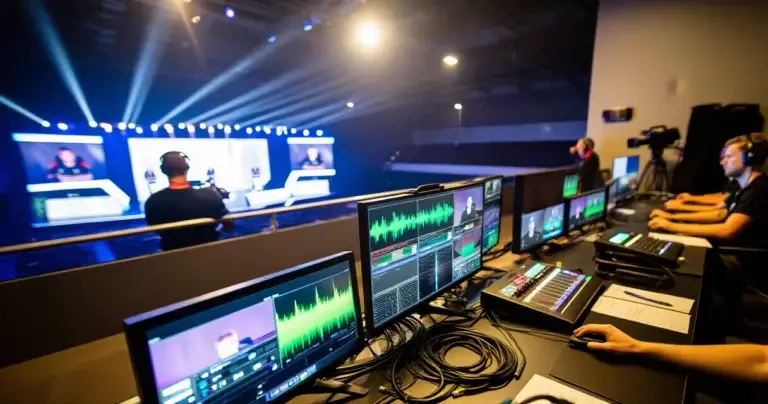
A live production switcher is the central routing hub that every camera, replay source, and graphic feed must pass through. PGL’s flyaway kits, detailed by SVG Europe, are built around the Blackmagic ATEM Constellation 8K — a hardware switcher capable of handling 40 SDI inputs at up to 8K or 160 inputs at 1080p. For most mid-tier esports events, its more accessible sibling, the Blackmagic ATEM 4 M/E Broadcast Studio 4K, provides a comparable workflow at a lower price point. Both support multi-view monitoring, DVE effects, and direct integration with Blackmagic’s camera-control panels, which PGL uses to manage production remotely from the gallery.
Signal Routing: SDI, HDMI, and Fibre
For venue-level esports production, SDI and fibre remain the dominant signal transport technologies in 2026. SDI cable supports distances of up to 100 metres without signal degradation and carries embedded audio, making it the standard choice for routing camera feeds across a tournament venue. PGL’s disclosed kit relies on SDI and fibre connectivity precisely because large esports arenas — and purpose-built event halls like those used in Singapore — often require signal runs far exceeding what HDMI can handle reliably.
HDMI remains useful for shorter desktop-level runs: connecting a capture card to a gaming PC, linking a monitor to a production desk, or sending output to a local display. For any run longer than roughly 15 metres, active HDMI cables or a conversion to SDI via a Blackmagic Mini Converter is the standard professional recommendation. Fibre is reserved for the longest distances and cleanest possible signal isolation — especially useful when routing between a production gallery and a main stage in a multi-floor venue.
Audio Equipment for Esports Tournament Broadcasts
Audio is the element most likely to undermine an otherwise polished esports broadcast. The standard professional configuration for a tournament includes a broadcast-grade audio mixer, dedicated commentator headsets, lavalier microphones for desk talent, and crowd microphones for atmosphere. For the commentary position, USB condenser microphones such as the Logitech Blue Yeti or a dedicated XLR option like the Shure SM7dB provide the clarity expected by viewers who follow esports on premium streaming platforms.
For desk segments with analysts and guests, lavalier microphones routed through an audio console prevent the desk becoming visually cluttered with boom arms and standing microphones. The audio mix is typically handled by a dedicated sound engineer running a digital audio workstation or hardware mixer, with separate buses for commentary, desk, crowd atmosphere, and in-game audio — all of which must be balanced and clean before reaching the encoder. Singapore-based production vendor Zenway Productions markets multi-camera live event capabilities that include dedicated audio mixing as a standard component of its event production packages.
Capture Cards and Streaming Encoders
Game capture is the layer that converts what is happening on a player’s PC into a signal the production can use. The Elgato 4K X and the Elgato HD60 X are two of the most widely referenced capture cards in the esports production community, with the 4K X supporting 4K60 HDR passthrough — relevant as esports displays move toward higher refresh rates and wider colour gamuts. Elgato hardware is confirmed available through Singapore retailers, and the brand’s accompanying software integrates with OBS Studio, the dominant open-source streaming and encoding platform used at all production scales.
At the encoding and streaming stage, the production feed must be transcoded and delivered to a CDN. Hardware encoders from Blackmagic (the Web Presenter series) or software-based solutions running on a dedicated encoding PC are both used in professional setups. The Creative Broadcast 2026 guide specifies a minimum 200 Mbps dedicated internet connection for venue-level tournament streaming — a figure that accounts for multiple simultaneous outbound streams, broadcast redundancy, and production data traffic. This connection must be separate from the gaming network used by competitors to eliminate any risk of contention.
Broadcast Equipment Comparison Table
| Equipment Category | Entry-Level Option | Professional Standard (2026) | Notes |
|---|---|---|---|
| Stage Camera | Sony ZV-E10 (1080p/60) | Blackmagic URSA Mini Pro 4.6K G2 | PGL-confirmed choice for major LAN events |
| Desk / Commentary Cam | Logitech StreamCam | Elgato Facecam Pro | Low-light performance critical for studio lighting |
| Live Switcher | Blackmagic ATEM Mini Pro | Blackmagic ATEM Constellation 8K | Scale input count to camera count |
| Capture Card | Elgato HD60 X | Elgato 4K X | 4K60 HDR passthrough for future-proofing |
| Signal Transport | Active HDMI (up to 15m) | SDI + Fibre | Fibre for long venue runs; SDI standard for stage |
| Commentary Microphone | Logitech Blue Yeti (USB) | Shure SM7dB (XLR) | XLR preferred for professional audio consoles |
| Streaming Encoder | OBS Studio (software) | Blackmagic Web Presenter 4K | Hardware encoder adds reliability for live events |
| Internet Connection | 100 Mbps dedicated | 200 Mbps dedicated (minimum) | Must be isolated from competitor gaming network |
ESL Broadcast Compliance Rules Every Tournament Operator Must Know
Equipment quality is only half the picture. The IEM Cologne Major Community Broadcast Guidelines published by ESL in May 2026 establish strict rules that affect how production equipment is configured and used. Community broadcasters must display no third-party branding, must use a standardised title format for their streams, and are prohibited from re-streaming the official broadcast feed. These rules mean that any overlay system — whether hardware or software — must be built to avoid logo placements that would trigger a compliance violation. Production teams need to test their graphic and overlay pipelines against these requirements before going live.
Equipment quality means nothing if the broadcast violates compliance rules on day one — ESL’s 2026 community guidelines make overlay and branding discipline as important as camera resolution.
Flyaway Kits and Mobile Production for Asian Tour Events
Singapore’s position as a regional esports hub means tournament operators frequently need to deploy production infrastructure across multiple cities in a single season. The flyaway kit model — a self-contained production bundle that can be packed into travel cases and deployed at any venue — has become the preferred approach for touring esports events. PGL’s four custom Blackmagic flyaway kits, each built around the URSA Mini Pro G2 and ATEM Constellation 8K, represent the benchmark: production-complete systems that can be operational within hours of arriving at a new venue.
For smaller operators in Singapore and the wider Southeast Asian circuit, the Datavideo esports tournament solution kit offers a more accessible 12-channel portable full-HD audio/video mobile cast system specifically marketed for esports events. This kind of mid-tier flyaway package bridges the gap between an improvised streaming setup and a full broadcast-grade production rig.
Budget Tiers: Equipment Investment by Tournament Scale
| Tournament Scale | Camera Standard | Switcher | Signal Type | Estimated Scope |
|---|---|---|---|---|
| Local / Community (up to 64 players) | 1080p/60 webcam or entry DSLR | ATEM Mini Pro | HDMI | Single commentator desk, 2–3 cameras |
| Regional Qualifier (up to 256 players) | 1080p/60 broadcast cam | ATEM 4 M/E | SDI | Multi-camera stage + analyst desk, dedicated encoder |
| LAN Major / International (500+ players) | 4K/59.94 (URSA Mini Pro G2) | ATEM Constellation 8K | SDI + Fibre | Full flyaway kit, gallery control, 8–12 cameras |
Frequently Asked Questions
What is the best camera for an esports tournament broadcast in 2026?
Based on disclosed production specs from PGL published by SVG Europe, the Blackmagic URSA Mini Pro 4.6K G2 is the current benchmark for major LAN events. It delivers native SDI output, captures at 4K 59.94 fps, and integrates directly with Blackmagic switchers and camera-control panels. For events with smaller budgets, any camera capable of 1080p at 60 fps with a clean output is the accepted minimum standard for 2026.
Should an esports tournament use SDI or HDMI for signal routing?
SDI is the professional standard for any run longer than about 15 metres. It locks mechanically into connectors, carries embedded audio, and supports distances of 100 metres without a repeater. HDMI is acceptable for short desk-level connections. For multi-stage or multi-floor venues, fibre optic signal transport is the preferred solution for the longest runs.
What internet speed is required for a tournament livestream?
According to the Creative Broadcast 2026 multi-camera streaming guide, the minimum dedicated connection for a venue-level esports broadcast is 200 Mbps. This connection should be completely separate from the gaming network used by competitors. Using a shared connection risks mid-match stream drops, which are unacceptable in a competitive broadcast environment.
What capture card is recommended for esports tournament streaming?
The Elgato 4K X is the current leading capture card for tournament-level game capture, supporting 4K60 HDR passthrough and direct compatibility with OBS Studio. For events capturing at 1080p/60, the Elgato HD60 X is a well-supported and widely available option. Both are confirmed available through Singapore retailers as of 2026.
Do community esports broadcasters need to follow compliance rules in 2026?
Yes. ESL’s 2026 co-streaming and community broadcast guidelines, published in April and updated for the IEM Cologne Major in May 2026, prohibit third-party branding in overlays, mandate specific stream title formats, and ban re-streaming the official broadcast feed. Any community broadcaster using tournament footage must configure their equipment and overlay systems to comply with these rules.
What microphone setup works best for esports commentary?
For tournament commentary booths, XLR microphones routed through a digital audio console give the cleanest and most controllable result. The Shure SM7dB is a professional-grade option that handles the high-energy delivery style common in esports commentary. For smaller events where a full audio console is not practical, the Logitech Blue Yeti and similar USB condensers provide broadcast-quality audio without additional hardware requirements.
Key Takeaways
The best esports broadcast equipment for tournaments 2026 forms a connected system, not a collection of individual purchases. Stage cameras must match the switcher’s input format; signal transport must be appropriate to venue scale; the encoder and internet connection must be sized to the output streams; and compliance rules from operators like ESL must be built into every overlay and graphics pipeline. Singapore’s formal recognition of esports in January 2026 marks a structural shift — one that raises both the opportunity and the expectation for professional broadcast quality across the regional circuit.
For teams tracking how leading production companies configure their equipment, the PGL flyaway kit disclosures via SVG Europe remain the clearest public benchmark available. For teams covering the Esports World Cup and other major tournaments as a production contractor, aligning to that benchmark is the lowest-risk path to meeting organiser expectations in 2026.
Singapore’s January 2026 Sports Council amendment transformed esports from a hobbyist pursuit into a legally recognised competitive discipline — and broadcast infrastructure expectations have followed that elevation.
Sources
- Straits Times — Parliament passes Bill to recognise chess, e-sports and others as sports — Retrieved September 6, 2026
- Ministry of Culture, Community and Youth Singapore — Unleashing Innovation and Seizing Opportunities in the Esports and Games Sector — Retrieved September 6, 2026
- U.S. Department of Commerce / trade.gov — E-sports and E-gaming in Singapore — Retrieved September 6, 2026
- ESL Pro Tour — IEM Cologne Major Community Broadcast Guidelines 2026 — Retrieved September 6, 2026
- SVG Europe — PGL adds to live esports production armoury with the addition of Blackmagic Design flyaway kits — Retrieved September 6, 2026
- Datavideo Singapore — E-Sport Tournament Solution Kit — Retrieved September 6, 2026
- Creative Broadcast — Multi-Camera Esports Streaming Setups: 2026 Guide — Retrieved September 6, 2026